|
|
|
|
|
It is possible that the download link provided above does not refer to the intended version.
If you are looking for HS CleanDisk Pro, you may try searching for a download link using
Google.
This software was checked for viruses and was found to contain no viruses.
Click here
to see antivirus report.
|
|
| |
|
|
Video tutorial for HS CleanDisk Pro 6.1
This video tutorial has been acquired from Downloadtube.com
|
Review
This review applies to version 6.1
The latest version of this software will soon be reviewed by our
informers.
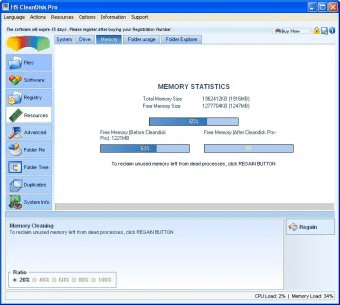
Windows system, disk, memory, cpu optimization and maintenance tool. What does the software offer ? MAINTENANCE Cleans drives from files left aside and unused. Cleans system registry from uninstalled software junks Safe uninstall of selected software from your system. Detects their occupied sizes and installation folders Searches duplicate files even their names are different If needed, permanently deletes unwanted files so no other software can restore them. SAFETY All modifications and cleaning processes may be restored at a later time, if secure button is checked. Alerts when suspicious running software is detected and when CPU usage is high (Optional) SPEED Administers and improves CPU usage of running applications Cleans computer memory from unnecessary data enabling your programs run faster Speeds up and optimizes internet connection settings. Terminates unwanted processes Application removal from start-up list PERFORMANCE Cleans internet cookies, caches, history, broken links Increases allover system performance OPTIMIZATION Advanced tasks can be applied to tune-up your system in simple usage. More than 20 advanced system optimization tasks so-called "OpTasks" can be applied to optimize the system. They are intelligent because first, your windows system is determined automatically and then only relevant tasks to your operating system will be displayed. Has ability to clean clipboard to increase memory space Auto-detects low memory in the system and boosts performance by refreshing memory space. Auto-runs at start-up, and surveys your system. (Optional) Increases free disk space INFORMATION Shows graphical system information (CPU/Drives/Memory) Shows graphical pie chart representation of folder usage and accessing all subfolders information via mouse click. Shows free memory space above taskbar in specified intervals. Registered users have lifetime free updates |
What's new in version 6.1
* Added: Export All to CSV Text File was added to popup menu of the Software Module. Selecting this menu item will report information about all installed software into an Excel supported file. * New user interface * Updated: Speed optimization in Folder Explorer * Minor fix on the drive combo box located on the Folder Usage menu. The fix is related to some drive letters that were missing on the combo box. * New: Scheduler Module which executes listed tasks at times prefered, has been included. * Minor bug fix in registry backup interface * Bug fix in disk information module which occurs when there are missing drive letters. * Since this release, the installation path can be modified during installation process. |
|
Report a wrong version
Report a wrong program title
Suggest a correction
|
Screenshots
|
|
|